

Tech Tools and Tips for Teaching Coding to Students with Learning Disabilities

Coding is at the heart of the technologies that are integrated into our digital world. It’s how we communicate with computers and build software, apps, websites and video games.
“Coding is a new form of literacy,” according to TekkieUni, an online coding school for young learners.
Understanding how to work with computer and coding software will be an in-demand skill for employers. However, teaching coding to children is about more than just improving their job prospects. Coding may also teach kids of all abilities and learning styles how to problem-solve, how to be creative and how to collaborate, among other skills.
But educators and parents should be aware of the barriers to inclusion that can exist when teaching computer science to neurodiverse children and those with learning disabilities and differences, as well as strategies and tools that can make learning coding more accessible to all students.
Teaching Students with Learning Disabilities
In U.S. public schools, there are 7.9 million students with disabilities receiving special education services, including students with learning disabilities, speech and language needs, and other health impairments and autism. Most of them are taught alongside their peers in all subjects, including computer science.
The five most common learning disabilities are:
- Dyslexia – Reverses the position of letters, struggles with text or speech.
- Attention Deficit/Hyperactivity Disorder (ADHD) – Struggles with focus and impulsivity.
- Dyscalculia – Struggles with math concepts such as measuring, time and estimating.
- Dysgraphia – Struggles to hold writing utensils and to write legibly.
- Dyspraxia – Struggles with fine motor skills that affect hand-eye coordination.
The concept of neurodiversity views brain variations as differences rather than deficits. So, in kids with learning disabilities, their brains simply work differently from those of neurotypical children. With strengths-based support such as mentorship and career counseling, neurodivergent students can thrive in STEM pathways. Research on neurodivergent STEM scholars has linked these supports with higher internship participation and greater career confidence.
A 2025 study of autistic software engineers notes that strengths such as attention to detail and logical reasoning, when fostered, can be valuable in software engineering tasks, such as identifying specific kinds of bugs in code.
“We need to be much more flexible — in the design of curriculum, in the design of tools, in the design of professional development, in the design of lesson plans.”
Can kids with ADHD learn coding? “The answer is definitely yes,” said Oren Zuckerman, who holds a Ph.D. from MIT, where he helped develop Scratch programming software. Zuckerman is the founder and director of the Media Innovation Lab at the Interdisciplinary Center in Herzliya, Israel, and an academic adviser for TekkieUni.
There Is No ‘Average’ Student
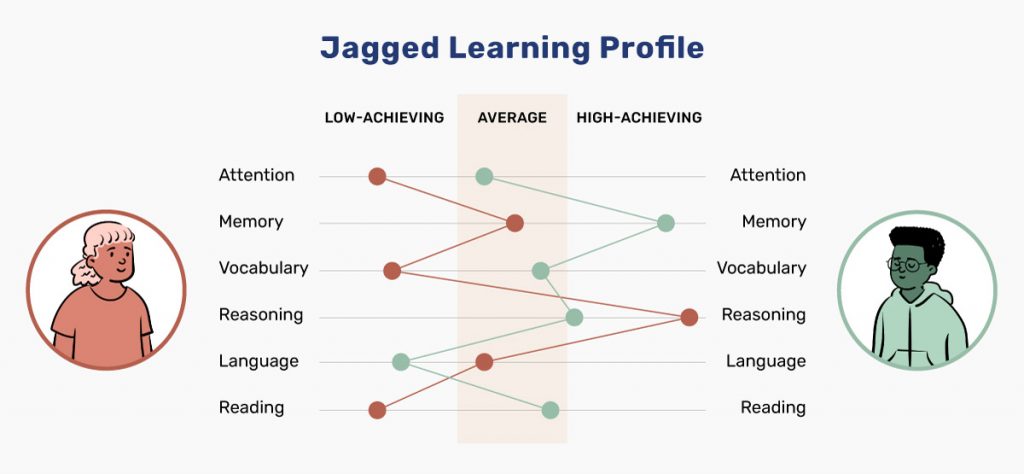
While it can feel overwhelming to meet the needs of learners with a wide range of strengths and support needs, computer science education researcher Dr. Maya Israel (University of Florida) encourages educators to adopt an inclusive design mindset, planning instruction with learner variability in mind rather than aiming for an “average” student.
“We all have a jagged learning profile,” she said. People don’t fall into discrete categories like low-achieving or high-achieving. Rather, we all have different strengths and things we struggle with, she explained. “So when we think about designing for the average, that middle category, essentially what that means is that we are not designing for anyone. … We need to be much more flexible—in the design of curriculum, in the design of tools, in the design of professional development, in the design of lesson plans.”
Barriers to Accessibility in Programming
Teaching coding to neurodiverse students and those with learning disabilities may require some adjustments to how coding is taught and the tools used to teach it. Israel noted there is “no such thing as a fully accessible programming platform.” What’s accessible to one population of learners may not be to another population.
She gave two examples of accessibility barriers in teaching coding:
- Visual programming tools. Block-based programming languages, such as Scratch, Snap and Blockly, are wonderful for many students with learning disabilities because “some of the syntax that they get lost in, they don’t have to worry about when they’re moving blocks of code around,” Israel said. However, those programming languages are inaccessible to students who are blind or have low vision.
- Open-ended, unstructured activities. Some of these open-ended activities have limited structure. “So for students who struggle with complex multistep problems, layering that structure on top as a scaffold and then slowly taking that away as students are learning those strategies on their own isn’t something that is typically built into curricula and tools,” Israel said.
Accessibility Benefits for All Students
More than 100 organizations have signed the accessibility pledge from CSforALL, a nonprofit and initiative to make high-quality computer science an integral part of K-12 education for all students in the United States. The pledge calls for commitments on such steps as putting captions on videos, ensuring compatibility with screen readers for visually impaired students and making sure all online content complies with accessibility standards.
PBS KIDS provides an example of accessibility design in action. The company included students with disabilities in its extensive user testing for its digital game Cyberchase Railway Hero. As a result, the game allows each player to set their own color contrast levels and font size, customize their closed captioning and adjust the audio settings, to reduce background noise to avoid sensory overload, for example.
“Whenever you solve an accessibility challenge, you end up solving other problems you didn’t even know you had.”
Designing for accessibility doesn’t only support students with disabilities; approaches like Universal Design for Learning (UDL) are intended to reduce barriers and improve learning for every student.
“Being able to hear a plain-language reader is just as much a game changer for sighted kids as it is for blind kids,” Emmanuel Schanzer, founder and co-director of Bootstrap, a research project based out of Brown University that develops computer-science curricula for K-12 classes. “This comes up over and over: Whenever you end up solving an accessibility challenge, you end up solving other problems you didn’t even know you had.”
The Universal Design for Learning (UDL) framework
One way to address the variability of student learning profiles and the barriers to accessibility is through the Universal Design for Learning (UDL) framework. UDL aims to improve and optimize teaching and learning for all people, with and without disabilities, based on scientific insights into how people learn. UDL goes beyond access to build in support and challenge.
The three principles of UDL at a glance:
- Representation. Show the information in different ways.
- Action and expression. Allow students to approach learning tasks and demonstrate what they know in different ways.
- Engagement. Offer options that engage students and keep their interest.
According to the website of CAST, the nonprofit education research and development organization that created the UDL framework, “UDL aims to change the design of the environment rather than to change the learner. When environments are intentionally designed to reduce barriers, all learners can engage in rigorous, meaningful learning.”
4 Skills That Neurodiverse Students Can Learn From Coding
Teaching young people how to code offers additional benefits beyond creating cool tech applications and learning marketable job skills. For neurodivergent students in particular, it can hone important social skills and help them become more confident.
1. Collaboration
In Crasnow’s school, teaching students computer programming leads to robotics. Students form teams to design, build and program a robot to perform a specific task. This teaches students who may tend to prefer working on skills to collaborate with others, he told District Administration (DA). “The three of them have to talk to each other—you can’t do the wiring without knowing the design and you can’t program without knowing what the robot’s going to do,” Crasnow said.
2. Perseverance
Coding and debugging software can be frustrating and confusing at times. When this occurs, teachers should resist the urge to give students with special needs the answers and instead encourage them to problem-solve on their own, such as by searching the internet, Leigh Ann DeLyser, executive director of CSforALL, told DA.
“There’s a tendency to want to help students with disabilities leapfrog over obstacles. But when they encounter difficulties and the challenge of solving the puzzle is part of the learning, building a step over an obstacle doesn’t necessarily benefit students.”
3. Problem-Solving
Coding asks students to use a structured problem-solving approach: they identify the goal, break complex problems into smaller parts, and build step-by-step solutions (a core idea in computational thinking).
Research since 2025 continues to support the introduction of programming early. Across studies of children roughly ages 3–7, programming interventions are associated with gains in computational thinking and mathematics-related outcomes, and play-based coding activities can also support problem-solving and communication/participation (important social learning behaviors in early classrooms).
4. Self-Confidence
District Administration also reports that the trial-and-error process of coding can make students better able to ask for and offer help in the classroom and overcome mistakes, increasing their self-confidence.
Learning to code can build confidence because it gives students frequent, concrete proof that their effort leads to solutions, especially when they troubleshoot and fix errors. In a 2025 profile from the University of South Florida, an instructor describes how students learn to break down systems, solve problems step by step, and build reusable components—and notes that through that process, “you can see their confidence grow.”
Resources to Teach Children How to Code
Here is an alphabetical list of some free and fee-based tools, classes and resources for parents and educators interested in teaching coding to children.
Alice: This 3D, block-based programming environment is focused on fundamental programming concepts, creating animations and storytelling.
Bootstrap Hour of Code: Introduction to Programming: In this self-paced lesson, students explore simple function composition and order of operations and build on that knowledge to create simple computer graphics.
Code studio: A free coding tool and courses for students age 4 and older, from the nonprofit Code.org.
CoderDojo: A global volunteer-led community of free programming workshops for kids 7 to 17.
Coding workbooks: Free workbooks for students in grades 1-6 from EdHelper.com.
CS Unplugged: Free material that teaches computer science concepts without a computer, through engaging games and puzzles that use cards, string, crayons and more.
Digital Promise: An organization that works with education leaders, researchers and technology developers, including Adobe, Amazon Business and Google, to improve learning opportunities for all and close the digital learning gap. Resources include a blog, free webinars for teachers and a K-12 STEM Activity Center.
MIT app inventor: A more advanced tool for coding, for seventh graders and above (can only be used on Android devices).
Puzzlets: A STEAM (Science, Technology, Engineering, Art and Math) tool that combines hands-on play with interactive games that teach students basic programming, math and art skills.
Quorum: The first “evidence-based” programming language initially developed for blind or visually impaired students. Instead of requiring users to listen to a screen reader or use a braille display, Quorum was designed to be accessible for readability and “hearability.”
Scratch: A free drag-and-drop programming language for readers 8 and older.
Sphero Edu: A platform that uses app-enabled robots to lay the foundation for computer science. Special education teachers like the Sphero robots’ many access points: students can interact with them through coding, voice and gestures, for example.
TekkieUni: This company teaches coding, computational thinking and digital expression to kids 8 to18 in small, online, live classes led by trained teachers. Courses include Scratch Programming for Kids, App Development for Kids and YouTube Creator.